Free noise-cancelling mic for calls on your Mac The office stays out of your calls. Your voice comes through warm.

Kelvin removes background noise from your mic and gives your voice a warm, close tone. Choose it once as your microphone and it works in every call app.
Hear it · open-plan office, 16 s
The call hears

Off: the call hears the room as it is. 5.5 dB quieter between words. Turn the knob while it plays.

Version 1.4 · Free · macOS 14+ · Apple Silicon · Release notes

  • Zoom
  • Google Meet
  • Microsoft Teams
  • FaceTime
  • Slack
  • Discord
How it works

Set it up once.

Kelvin adds a microphone called “Kelvin Mic” to your Mac. Your call app listens to it, and Kelvin listens to your real mic.

  1. Install KelvinIt asks for your mic once and adds “Kelvin Mic” to the system.
  2. Pick “Kelvin Mic” in your call appIn Zoom, Meet or Teams audio settings. They remember it.
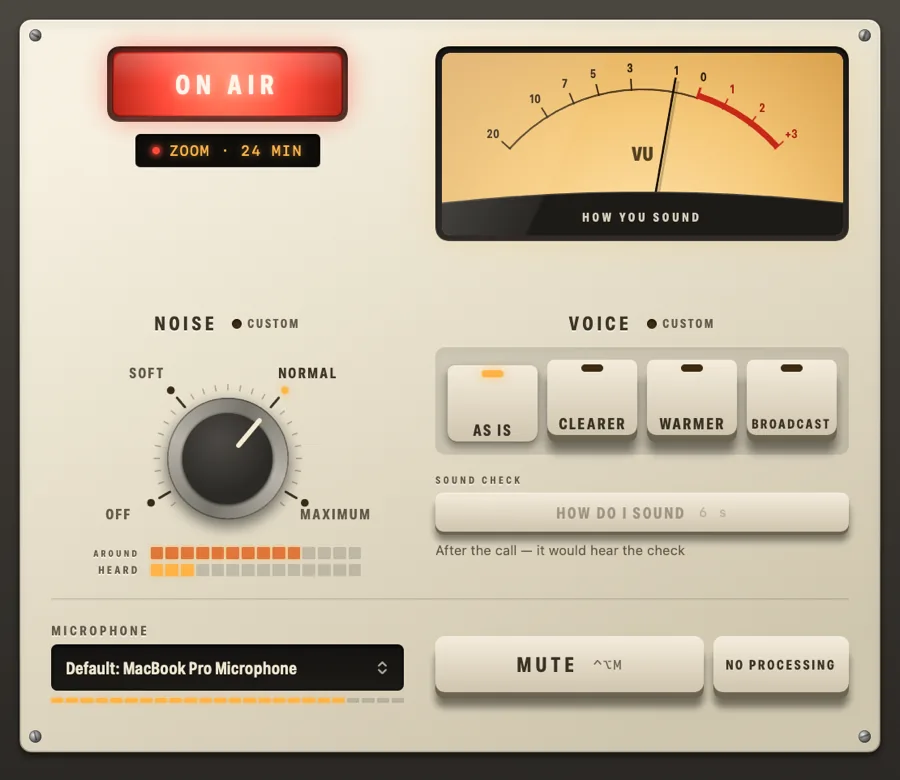
  3. TalkThe lamp lights up ON AIR while an app hears you. “How do I sound” plays back 6 seconds of you, before and after.
Kelvin's panel: a lit ON AIR lamp over a readout saying Zoom, 24 min, a VU meter labelled How you sound, a Noise knob and four Voice keys
Two controls. Noise: Off, Soft, Normal, Maximum. Voice: As is, Clearer, Warmer, Broadcast. The knob on Kelvin’s icon in the Dock and the menu bar turns with Noise, so you see it without opening the app.
The Voice keys

Choose how you sound.

The same four keys as in the app. Noise stays on Normal; the keys change only the tone of your voice. Switch while it plays.

4000K

As isNoise gone, voice untouched. Even loudness, nothing added.

What happens inside
High-pass80 Hz
Hum filterauto 50 / 60 Hz
Noise suppressionDPDFNet neural net, on device
Noise: Soft · Normal · Max15 · 50 · 100 dB
Levelingto −20 dBFS, up to +12 dB
Clearerpresence +3 dB, de-esser 6 dB, 2:1
Warmerwarmth +2 dB, box −4 dB
Broadcasttone ±3 dB, de-esser 4 dB, 3:1, −16 dBFS
Already have noise removal?

What Kelvin adds.

macOS Voice Isolation and the filters inside call apps remove noise. Kelvin does that too, and then:

One setting for every app

Kelvin Mic is a regular system microphone. Anything that lets you pick a mic uses it, browser calls included, with the same sound everywhere.

It shapes your voice

Noise removal leaves a thin, boxy laptop voice. The Voice keys bring back warmth and clarity.

You can hear yourself

“How do I sound” records 6 seconds and plays them back before and after. The VU meter shows how loud others hear you.

It stays on your Mac

All processing runs locally. No account, and your voice never goes to a server.

Why “Kelvin”

Light has a temperature. So does a voice.

Light colour is measured in kelvins. An office ceiling panel is about 6500K: cold and flat. A lamp at home is 2700K, firelight about 1900K. The light on this page warms the same way as you scroll down.

Questions

Before you download.

How do I remove background noise from my mic on a Mac?

Install Kelvin and choose “Kelvin Mic” as the microphone in your call app. A neural noise suppressor running on your Mac takes out typing, air vents, fans and mains hum before the app hears you.

Does it work in Zoom, Google Meet and Microsoft Teams?

Yes. Kelvin Mic is a regular system microphone, so it works in any app that lets you pick a mic: Zoom, Google Meet and Teams in the browser or the desktop app, FaceTime, Slack, Discord and recording apps.

Is Kelvin free?

Yes. Kelvin is free to download and use, with no account and no sign-up.

Does my voice go to a server?

No. All processing runs on your Mac. Kelvin works offline and never sends your audio anywhere.

Which Macs does it run on?

Macs with Apple Silicon (M1 and later) on macOS 14 Sonoma or newer. Intel Macs are not supported.

How is it different from Voice Isolation or Krisp?

Like Krisp, Kelvin is a virtual microphone that removes noise for every app at once. macOS Voice Isolation removes noise too, but only where an app offers it. On top of noise removal, Kelvin's Voice keys shape the tone: Clearer, Warmer or Broadcast instead of a thin laptop voice.